In a series of lab projects, my partner and I completed the design of a pipelined processor and memory system. No, we didn’t connect every wire in the microchip by hand. We designed the system with a hardware language that recreates the microprocessor on an FPGA. [Field-programmable gate array is a microchip with programmable fabric that can be continually redesigned into new microchips. More on this in a later post…]
The microprocessor chip is the heart of any computer. It’s the workhorse that grabs data, performs logic on it, and spits out the new data to where it belongs. One factor that determines computation power is the speed/frequency of its processor. The computer I’m typing on uses an Intel i5 Processor at 1.8 GHz. That means every second, it can perform 1.8 billion cycles of computer busywork.
Estimating the average human’s cardiac cycles over a 60-year lifetime: a person will experience (60 heartbeats per minute)*(1440 minutes per day)*(365 days per year)*(60 years) = 1.89 billion heartbeats. In essence, computers can do great things mostly because humans designed them to manage a lifetime of busywork in each second.
New skills: Processor design in Verilog code using Xilinx ISE synthesis and analysis tools.
Key Takeaway: Forget final exam scores; a class should be measured by the number of times a student is stunned with realization, making him see the world a little differently. For me, this was such a course: where the perfect blend of lectures, assigned reading, homework problems, and final design project blended perfectly into a world-expanding experience.
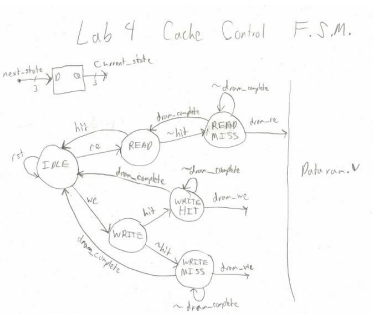
My handwritten diagram of our cache system! Caches store recently used (or spatially close) data for easy-access because the processor is likely to use that data again. Similar to why a browser’s cache will locally store website elements that you commonly visit, so the browser doesn’t have to re-download them over the Internet every time.
 Starting